Automate Upwork bidding without an AI agent
No AI agent taking over your Upwork account and making its own calls. AutoGig is a Chrome extension in your own browser that follows the rules you set: it works through the Upwork search you point it at, skips jobs that trip its screening rules and logs why, can price each bid from what the client has actually paid, and fills the proposal. AI only drafts the proposal's wording, in your voice. You press Send, or it sends for you inside the limits you set.
30-day free trial · No credit card required · Then from $29/month
Start your trial, then add AutoGig to Chrome and connect it to your account.
- Proposal sentSenior React DeveloperRate from client's paid average
- SkippedWordPress Site FixesClient hires too rarely
- SkippedAI Chatbot IntegrationWants to move the chat off Upwork
See AutoGig work, in under two minutes
The problem, the dashboard, how it bids and what it skips, the CRM add-on, agencies, and full control. It plays as you scroll; click it to pause.
Bidding by hand spends Connects on the wrong jobs
Clients who rarely hire, off-platform asks and budgets that don't fit cost the same Connects as a good job, and reading every post closely takes hours. A screen that runs before you bid is the fix.
The old way
- Read every post in full to judge whether it's worth a Connect
- Copy-paste the same generic proposal to everyone
- Spend Connects pitching clients who almost never hire
- Guess your rate, then find out the client never pays that much
- No ceiling on how many Connects a busy day burns
With AutoGig
- Works through the Upwork search you point it at, on the schedule you set
- AI writes the proposal from that job's post, following instructions you write
- Skips clients who rarely hire and off-platform asks, and logs the reason
- Can set your rate from what the client has actually paid
- Built to stay inside your daily bid cap, spend cap and pause switch
Everything you need to bid well on Upwork
From reading the job to submitting the proposal, AutoGig handles the busywork so you can stay focused on delivering.
Screened, Priced, Written
Point it at an Upwork search with your own filters (budget, category, client history). AutoGig screens each job from that search before a Connect is spent, can set your hourly ask from what the client has actually paid, and has AI write the proposal from the job's post. It runs as a Chrome extension in your own browser: it fills the proposal for you to send, or sends it for you on the schedule you choose.
- An AI-written proposal from the job's own post, in the voice and instructions you set
- Works from the Upwork search you set up, with Upwork's own filters
- Skips clients who rarely hire, off-platform asks and known scam patterns
- Automatic sending keeps to a schedule and timezone you choose, while Chrome is open on your computer
Senior Full-Stack Developer
Hourly · Expert
“Hi — I noticed you need a senior full-stack dev for a React + Node platform. I’ve built production apps on this stack, and I can start this week…”
A Dashboard for Every Bid
With automatic sending, see the jobs the extension acted on: what it sent, what it skipped and why, the rate it asked next to what the client has paid, and which profile bid. Pause it or change its limits from the dashboard, and the extension picks up the change on its next cycle.
- History of the jobs it sent or skipped, with the reason
- Your ask next to the client's average paid rate
- Pause switch, daily bid cap and daily spend cap
- Several Upwork profiles for agencies, each in its own voice
History
Sent or skipped, with the reason- SentSenior Full-Stack DeveloperAsked the client's average paid rate
- SkippedLanding Page in Next.jsClient hires too rarely
- SkippedMobile App MVPWants to move the chat off Upwork
- SkippedClone Our Repo and List Fixes FirstMatches a known scam pattern
Set it up once, then let it bid
Start your trial, set your search and limits, add the extension to Chrome and connect it. The Setup Guide walks through every click.
Start Your Free Trial
Create your account: 30 days, no credit card. On your dashboard, answer “Who's bidding?” with My agency (it works with a single profile) and add your profile: the Upwork search it should work through, a minimum rate, your GitHub URL and a voice. It saves as you type.
Set Your Words and Limits
In Settings, replace the starting proposal instructions with your own and set your schedule and daily bid cap (if you see job-filter fields, Max bids / run or Delay between bids, leave them: the extension doesn't apply them yet). Set a daily spend cap on the dashboard, and check that Bidding is On on your dashboard home.
Add to Chrome and Connect
Add the AutoGig extension to Chrome from the Chrome Web Store, open its side panel and press “Connect to AutoGig”. Sign in on the page it opens and press “Connect the extension”. It reads your profiles, search and limits from the dashboard on every cycle: there's no file to download or import.
Choose How It Bids
In the side panel, pick “Fill the proposal, I press Send”: it screens the next job from your search, writes the proposal and fills the form, then leaves the tab open for you. Or pick “Send proposals automatically” and confirm: it submits proposals and spends your Connects, built to stay inside your pause switch, daily caps and schedule.
Before you turn it on
- For now the extension bids only on hourly jobs that post a rate: it skips fixed-price jobs and hourly jobs with no posted rate.
- Replace your account's starting proposal instructions in Settings before you start: they aren't about you. If yours tell the AI to write in a “we” agency voice or claim 12 years of experience, that is our own agency's stock text.
- If the AI can't write a proposal, the extension skips the job and sends nothing. Screening questions get short stock answers that offer to share details in a message, and a GitHub question gets the GitHub URL on your profile (a general line with no link if that field is empty).
- Fill only logs nothing to your dashboard: the side panel shows what it did, and a proposal you send yourself doesn't appear in your History. Automatic sending logs the jobs it sends and the ones it skips, with the reason.
- Set up AutoGig before the extension, with a workflow file you imported? Turn that workflow off. The extension won't send while an older AutoGig bot has bid on your account in the last 20 minutes. Never run the two together.
- Keep Chrome open: the extension works only while Chrome is running, in an Upwork tab it opens and closes itself, where you're signed in to Upwork.
Upwork restricts bots and automation and may warn, restrict or block accounts that use them. You are responsible for how you use AutoGig.
Replies become a pipeline
AutoGig sends the proposals. The CRM shows every client who writes back, with their status and next step, across Upwork and LinkedIn.
Your Upwork chats in one place
Your Upwork inbox synced in: the transcript, attachments and the client's photo, on one client list.
Hot and warm clients first
AI reads each conversation and picks out the hot and warm clients who have spent on Upwork, most recent conversation first.
A heat tag and a status on every client
A heat tag such as Warm or Cool, and a status such as Engaged or Gone cold, so a quiet conversation stands out.
Back to Upwork in one click
Each client links straight to their Upwork chat, so you reply where the contract happens.
A LinkedIn pipeline too
Leads from LinkedIn move across a board (New, Replied, Interested or call done, Sold customers), next to your Upwork clients.
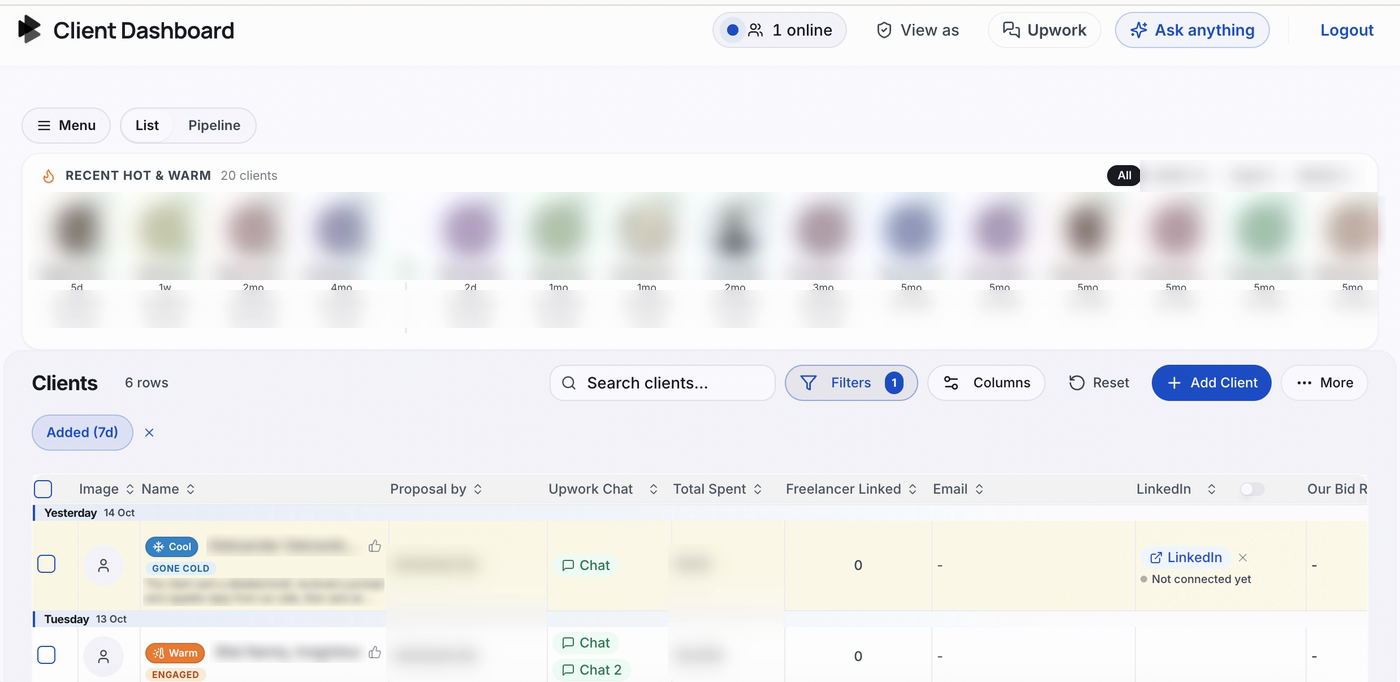
Screenshots of the CRM on our own agency's account. Names, faces and client details are blurred.
Runs on our own agency's account today
- Not part of a plan yet
- Join the waitlist: talk to us
Simple monthly pricing
Start free for 30 days — no credit card required. Keep it only if it's earning its place.
Starter
For solo freelancers getting started.
Free trial first: 30 days, 1 profile, no card
- 1 Upwork profile
- The AutoGig Chrome extension: fills the proposal for you to send, or sends it for you
- Job screening before a Connect is spent, with the reason for every skip
- Hourly ask from what the client has actually paid
- AI-written proposals, with instructions you can edit
- Daily bid cap, daily spend cap, schedule and pause switch
- Dashboard with bid history and charts
- Email support
Pro
RecommendedFor full-time freelancers scaling up.
Free trial first: 30 days, 1 profile, no card
- Everything in Starter
- Up to 3 Upwork profiles, switched on by hand after your first payment
- Each profile with its own search, minimum rate and voice
- Profiles take turns, one per cycle
Agency
For teams and agencies.
Free trial first: 30 days, 1 profile, no card
- Everything in Pro
- Up to 20 Upwork profiles, switched on by hand after your first payment
You start with one 30-day free trial, no credit card required. The trial covers one Upwork profile, and the dashboard's charts unlock on a paid plan. When it ends, nothing is charged: to keep bidding, pick a plan on the Upgrade page in your dashboard. The extra profiles on Pro and Agency aren't switched on automatically yet: we switch them on by hand after your first payment, and if your dashboard still allows one profile, email us. Paid plans renew each month until you cancel. To cancel, or to claim the separate 30-day money-back guarantee on a paid plan, email hello@autogig.io; there's no cancel button in the dashboard yet.
Every plan runs through the AutoGig Chrome extension: start your trial, then Add to Chrome and connect it to your account from its side panel. You don't need to download anything from the dashboard.
Upwork restricts bots and automation and may warn, restrict or block accounts that use them. You are responsible for how you use AutoGig. Read the FAQ before you start.
Try AutoGig free for 30 days
Start with a full month free — 30 days, no credit card required. If it earns its place, pick a plan from $29 a month and keep bidding. If it's not for you, walk away having paid AutoGig nothing. Every paid plan is also backed by a 30-day money-back guarantee: email hello@autogig.io to claim it.
Questions? Answered.
No. Your 30-day free trial needs no credit card: create your account, set up your profile and limits, and add the AutoGig extension to Chrome. You only add billing when you decide to keep going.
Stop paying to pitch clients who never hire
AutoGig screens the jobs from your Upwork search, can price the bid from what the client has paid, and writes the proposal. Start free — no credit card required.
30-day free trial · Then from $29/month · Cancel by email anytime